
Introduction
A tracking number is a unique identifier used to follow a package, parcel, or mail item as it moves through a delivery network. When you enter the number on the carrier’s tracking page, you can usually see information such as shipment progress, recent scans, delivery estimates, attempted delivery details, or confirmation that the package was delivered.
The exact format and tracking information depend on the carrier and shipping service. A postal tracking code may look very different from a private courier’s shipment number. For example, the Universal Postal Union’s S10 standard uses a 13-character structure made up of two letters, eight serial digits, a check digit, and two country-code letters, but not every carrier uses this format.
This guide explains how tracking numbers work, where to find yours, how to check a shipment, what common tracking statuses mean, and what to do when tracking information does not appear.
What Is a Tracking Number?
A tracking number is an identifier assigned to a shipment so the carrier and related logistics systems can associate scans and shipment events with that parcel.
As a package moves through the network, it may be scanned at different points. Those scans can create a timeline showing events such as acceptance, movement between facilities, arrival at a local facility, dispatch for delivery, and final delivery.
The exact amount of information available varies by carrier, service, destination, and shipment type. For example, USPS says its tracking service can provide current status information and, when available, delivery or attempted-delivery details.
A tracking number generally helps answer questions such as:
- Has the carrier received the package?
- Where was the latest scan?
- Is the shipment moving?
- Is it out for delivery?
- Has delivery been attempted?
- Has the package been delivered?
- Has an unexpected delay or exception occurred?
Tracking does not necessarily provide the package’s exact physical location at every moment. Tracking information is normally based on recorded shipment events and scans.
Tracking Number vs. Order Number
One of the most common sources of confusion is treating an order number and a tracking number as the same thing.
An order number identifies a purchase in a retailer’s or marketplace’s system. A tracking number identifies a shipment within a carrier or logistics network.
For example, an online store might give you:
| Identifier | What it usually identifies |
|---|---|
| Order number | Your purchase from the retailer |
| Tracking number | The shipment carrying the order |
| Reference number | A shipment, customer, or transaction reference |
| Invoice number | A billing or purchase document |
| Return authorization number | A return request or process |
If a carrier’s website rejects your order number, look at the retailer’s shipping confirmation for the actual carrier tracking number.
A single order can also have multiple tracking numbers. This can happen when an order is split into separate shipments.
Where Can You Find Your Tracking Number?
The easiest place to find a tracking number is usually the shipping confirmation sent by the retailer, seller, or carrier.
Check these locations:
- Shipping confirmation email
Look for terms such as “tracking number,” “tracking ID,” “shipment number,” or “track your package.” - Retailer’s order page
Sign in to the account used to place the order and open the relevant order. - Carrier notification
A courier or postal operator may send a shipment notification containing the tracking information. - Shipping receipt
If you sent the package yourself, the tracking number may be printed on your receipt. - Shipping label
The number is often printed near or beneath a barcode. - Marketplace account
If you purchased through a marketplace, check the shipment details rather than relying only on the order number.
USPS explains that when an item has a tracking number, it is generated and provided to the sender. If you are the recipient and cannot find it, the sender may need to provide it. USPS also notes that not every type of mail has tracking.
Canada Post similarly says tracking information can appear on a receipt or shipping label, depending on the service used.
How to Track a Package Using a Tracking Number
The safest method is to use the official website or app of the carrier handling the shipment.
Step 1: Identify the Carrier
First determine whether the shipment is being handled by USPS, UPS, FedEx, Royal Mail, DHL, a national postal service, or another delivery company.
The carrier may be listed in the seller’s shipping confirmation.
Step 2: Copy the Tracking Number
Copy the number directly from the shipping confirmation when possible.
Be careful with:
- Extra spaces
- Missing characters
- Letters confused with numbers
- Punctuation
- Incorrectly copied characters
Do not replace characters simply because the tracking number looks unusual. Different carriers use different formats.
Step 3: Open the Official Tracking Page
Go directly to the carrier’s website instead of relying on an unexpected tracking link in a text message.
For example, USPS Tracking provides USPS shipment tracking, while UPS Tracking Support provides UPS tracking and status information.
FedEx also provides an online tracking tool where users can enter a tracking number or, for some shipments, another supported reference.
Step 4: Enter the Number
Enter the tracking number exactly as provided and submit the search.
If the carrier recognizes it, the results may show the current status, shipment history, estimated delivery information, and other available details.
Step 5: Read the Latest Event
The most recent scan is usually the best starting point for understanding what is happening.
Do not assume that every scan represents the package’s exact current location. A shipment can continue traveling after its last recorded scan.
Common Tracking Number Formats
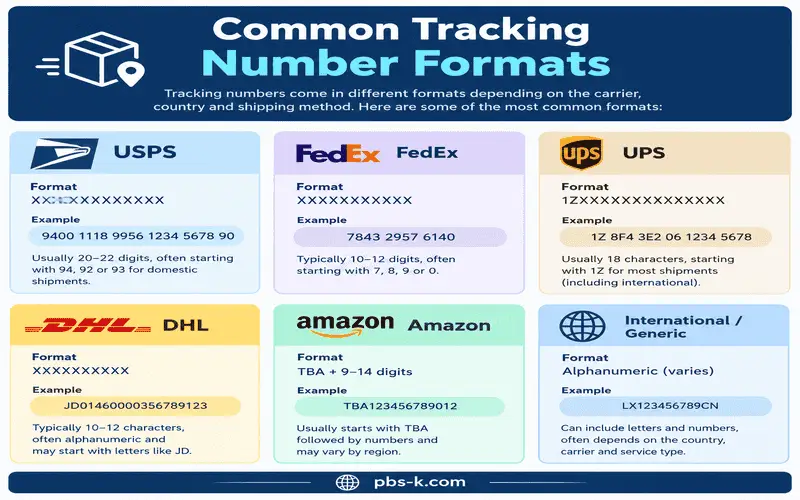
There is no single universal tracking number format.
Private carriers and postal operators use their own numbering systems. International postal shipments may use standardized identifiers in some circumstances.
The UPU S10 standard, for example, specifies a 13-character identifier consisting of a two-letter service indicator, eight-digit serial number, one check digit, and a two-letter country code.
Some international postal tracking numbers therefore contain both letters and numbers.
Other carrier numbers may contain primarily numbers or a combination of letters and numbers.
This is why you should not determine whether a tracking number is legitimate solely by its appearance. The carrier’s tracking system is a better way to verify whether the number is recognized.
What Do Tracking Statuses Mean?
Tracking language differs between carriers, but many shipment systems use similar stages.
Label Created
A label has been created and shipment information has been submitted.
This does not necessarily mean the carrier physically has the package.
For example, UPS says “Label Created” means it has received shipment details and billing information, while the status changes after the shipment is in its network. FedEx similarly describes “Label created” as indicating that the shipping label has been created.
Pre-Shipment
The sender has prepared shipment information, but the package may not yet have received its first carrier acceptance scan.
If this status remains unchanged, contact the sender before assuming the package is lost.
Accepted or Received
The carrier has recorded receipt of the shipment.
This is generally a more meaningful milestone than simply having a shipping label created.
In Transit
The package is moving through the carrier’s network.
“In transit” does not necessarily mean that the package is continuously moving at that exact moment. It may be between facilities or waiting for its next scan.
UPS explains that a shipment can remain in an “On the Way” status during long-distance movement and may not receive another scan until it reaches a destination facility.
Arrived at Facility
The package has reached a carrier facility and has been scanned there.
It may later leave for another sorting center or destination facility.
Out for Delivery
The package has reached the final delivery stage.
For example, UPS says “Out for Delivery” means the local facility has received the shipment and dispatched it to a driver. FedEx describes the status as meaning the package has been scanned and is ready for or already undergoing delivery.
Delivered
The carrier has recorded the shipment as delivered.
Depending on the service, the tracking information may include the delivery date, time, location, signature information, or other proof of delivery.
USPS says a delivered status can include the recorded date, time, and delivery location when available.
Exception or Delay
An exception generally indicates that something has affected normal shipment progress.
Possible causes include:
- Weather
- Customs processing
- Address problems
- Operational issues
- Delivery attempts
- Transportation problems
- Other unexpected circumstances
The precise meaning depends on the carrier and the shipment.
FedEx, for example, lists weather and customs delays among circumstances that can lead to an exception.
Why Is My Tracking Number Not Working?
There are several possible reasons a tracking number may not return information.
The Label Was Just Created
The seller may have generated the shipping label but not yet handed the package to the carrier.
In this situation, waiting for the first acceptance scan is often appropriate.
The Number Was Entered Incorrectly
Check the number carefully.
Compare it with the original email, receipt, or label rather than relying on memory.
You Are Using an Order Number
A retailer’s order number may not work on the carrier’s website.
Return to the retailer’s order page and look for the shipment-specific tracking number.
The Carrier Has Not Scanned the Package Yet
A tracking number can exist before the carrier’s system shows movement.
FedEx explains that shipment details may not update until the package has been received by FedEx.
The Wrong Carrier Was Selected
International shipments can involve more than one postal or logistics provider. A number may also be transferred between networks during delivery.
Try identifying the carrier from the shipping confirmation or seller’s shipment details.
The Shipment Has Not Been Sent
A seller can create a tracking number before the package actually leaves the seller’s facility.
If the status remains at label creation or pre-shipment for an unusually long period, contact the seller.
Why Has My Package Stopped Updating?
A lack of new tracking events does not automatically mean that a package is lost.
There can be gaps between scans, particularly when a shipment is traveling a long distance. UPS specifically notes that long-distance shipments may not receive another scan until reaching a destination hub.
Before contacting the carrier, check:
- The date and time of the latest scan.
- The estimated delivery date.
- Whether the shipment is still listed as in transit.
- Whether an exception or delay is displayed.
- Whether the sender has provided additional information.
- Whether customs processing is involved in an international shipment.
If the shipment is significantly past its expected delivery date or the carrier instructs you to contact support, use the carrier’s official support process.
Can You Track a Package Without a Tracking Number?
Sometimes, yes, but it depends on the carrier and shipment.
A retailer may let you view the shipment through your order account. Some carriers also support reference numbers, door-tag numbers, purchase-order numbers, or other identifiers.
FedEx, for example, says that customers without a tracking number can use a reference number associated with the shipment or a purchase order number in supported situations.
However, you should not assume that an address, recipient name, or order number will always be enough to retrieve tracking information.
The easiest solution is usually to ask the sender or retailer for the actual shipment tracking number.
Can You Track a Package With Just a Name or Address?
Usually, a name or address alone is not a substitute for a tracking number.
Carriers have different privacy and verification procedures, and they may not allow customers to search all shipments associated with an address.
For example, Canada Post states that it does not keep shipment records searchable by address or name for the purpose of recovering a missing tracking number.
If you do not have the number, check your retailer account, email, receipt, or contact the sender.
How Accurate Is Package Tracking?
Tracking information is useful, but it has limitations.
A tracking system reports recorded events. It is not necessarily a continuous GPS feed showing the parcel every second.
The available information can depend on:
- Carrier
- Shipping service
- Location
- Scan frequency
- Transportation stage
- Customs processing
- Delivery method
- Technical availability of tracking data
Some services provide more detailed information than others.
FedEx, for example, may provide estimated delivery windows and map-based information for eligible shipments.
USPS likewise states that its tracking system provides available status and delivery information but does not expedite or guarantee delivery.
Therefore, a tracking page should be treated as the carrier’s latest recorded shipment information, not a guarantee of the package’s exact real-time position.
International Tracking Numbers
International shipments can be more complicated because multiple postal or logistics networks may participate in delivery.
A shipment may be accepted in one country, transported internationally, processed by customs, and then handed to a destination-country postal operator.
Some international postal shipments use UPU standards. The UPU S10 identifier is designed as a 13-character postal identifier, although the existence of an S10-shaped code does not by itself prove that a particular number is a valid S10 identifier.
When tracking an international parcel:
- Start with the carrier shown by the seller.
- Check the original tracking number carefully.
- Look for customs or clearance events.
- Check the destination country’s postal operator when appropriate.
- Allow for periods without scans during international transportation.
- Do not assume a lack of updates means the shipment has disappeared.
International delivery can involve longer periods between visible tracking events than domestic delivery.
Tracking Number Safety and Delivery Scams
Tracking numbers are also commonly used in package-delivery scams.
A scammer may send an unexpected text or email claiming that your package has a delivery problem. The message may contain a tracking number and ask you to click a link, confirm personal information, or pay a small fee.
The safest approach is to verify the shipment independently.
Do not rely on the link supplied in an unexpected message. Instead, open the retailer’s website or the carrier’s official website yourself and enter the tracking information there.
The U.S. Federal Trade Commission reported that fake package-delivery problems were the most commonly reported type of text scam in its 2024 data, with consumers reporting $470 million in losses to text-message scams overall that year.
The U.S. Postal Inspection Service also warns about package-tracking text scams and advises recipients not to click unexpected links in messages claiming to concern a USPS delivery.
Warning Signs of a Fake Tracking Message
Be cautious when a message:
- Arrives unexpectedly.
- Says your package will be returned immediately unless you act.
- Requests card or bank information.
- Asks you to pay an unexpected redelivery fee.
- Contains a suspicious or shortened link.
- Uses a tracking number you do not recognize.
- Creates unusual urgency.
- Sends you to a website that does not belong to the claimed carrier.
If you are expecting a package, verify its status through your retailer account or by manually visiting the carrier’s known official website.
Tracking Number Tips for Buyers and Sellers
A few simple habits can make shipment tracking easier.
Save the Original Shipping Email
Keep the shipping confirmation until the package has arrived and any return period or delivery issue has been resolved.
Use the Carrier’s Official Site
If there is a tracking problem, start with the carrier that issued the number.
Keep the Number Exactly as Provided
Do not modify a tracking number simply because its format looks unusual.
Check the Latest Scan, Not Just the Headline
The detailed shipment history can provide more useful information than a general status such as “in transit.”
Contact the Seller When Appropriate
For an online purchase, the seller may be able to investigate shipping issues, contact the carrier, replace an item, or initiate a claim.
Be Careful With Unexpected Tracking Links
If a message appears suspicious, do not use the included link. Verify the shipment independently instead.
What Should You Do If a Package Says Delivered but Is Missing?
Start by checking the delivery details shown by the carrier.
Look around common safe delivery locations and check whether the package was left with:
- A household member
- A neighbor
- Building reception
- A mailroom
- A parcel locker
- Another protected location
Also verify that the tracking number belongs to your shipment.
USPS advises customers whose packages show as delivered but cannot be found to check possible safer delivery locations.
If you still cannot locate the shipment, follow the carrier’s missing-package or delivery-issue process and contact the seller if the purchase was made through an online retailer.
When Should You Contact the Carrier?
Contact the carrier when the tracking information indicates a problem that requires carrier assistance, especially when:
- The package is substantially overdue.
- The tracking status shows an exception.
- Delivery was recorded at an incorrect location.
- A delivery attempt requires further action.
- The carrier specifically instructs you to contact support.
- The shipment appears damaged or incomplete.
For an online purchase, contacting the seller can also be important because the seller may control the shipment claim or replacement process.
A Simple Tracking Number Checklist
If you are trying to locate a package, use this quick checklist:
- Find the shipping confirmation.
- Identify the carrier.
- Copy the tracking number exactly.
- Open the carrier’s official website.
- Enter the number manually or through the official tracking tool.
- Read the latest scan and shipment history.
- Check the estimated delivery information.
- Look for an exception or delay.
- Contact the seller if the tracking number does not work.
- Avoid unexpected tracking links asking for payment or personal information.
This approach solves many common tracking problems without relying on questionable third-party links.
Conclusion
A tracking number is the key identifier used to follow a shipment through a carrier’s delivery network. The most important distinction to remember is that a tracking number identifies the shipment, while an order number normally identifies the purchase.
When tracking a package, use the carrier’s official website, check the latest recorded scan, and understand that tracking data is based on shipment events rather than necessarily showing the parcel’s exact location at every moment.
If a number does not work, first verify that it is the actual tracking number, check whether the carrier has received the parcel, and contact the sender when necessary. Most importantly, treat unexpected delivery texts and emails carefully and verify package information independently before clicking links or providing payment details.
FAQs
What Is a Tracking Number?
A tracking number is a unique identifier associated with a shipment. It allows a carrier’s tracking system to display available shipment events and delivery information.
Is a tracking number the same as an order number?
No. An order number generally identifies a purchase with a retailer, while a tracking number identifies a shipment moving through a carrier’s network.
Where can I find my tracking number?
Check your shipping confirmation email, retailer account, carrier notification, shipping receipt, or package label. If you are the recipient and cannot find it, ask the sender or retailer.
Why does my tracking number say it cannot be found?
The number may have been entered incorrectly, the shipment may not have received its first scan, the label may have been created but not handed to the carrier, or you may be using an order number instead of the tracking number.
Can I track a package without a tracking number?
Sometimes. Depending on the carrier, you may be able to use a reference number, purchase-order number, door-tag number, or retailer order system. Availability varies by shipment.
Does a tracking number show the exact location of my package?
Not necessarily. Tracking normally displays recorded scans and shipment events. Some services provide additional location or map information, but tracking is not always a continuous real-time location service.
How long does it take for a tracking number to start working?
It can take time for shipment information to appear, particularly when a label has just been created and the carrier has not yet received or scanned the package.
What does “out for delivery” mean?
It generally means the package has reached the final delivery stage and has been dispatched for delivery. The precise wording and timing depend on the carrier.
What does “label created” mean?
It normally means that shipping information or a shipping label has been created. It does not necessarily mean the carrier already has physical possession of the package.
Can someone use my tracking number to steal my package?
A tracking number alone does not normally give someone control over a shipment, but you should still avoid sharing unnecessary personal shipment information. More importantly, be cautious of scams that use tracking numbers to make fraudulent messages appear legitimate.
What should I do if I receive a suspicious package-tracking text?
Do not click the link or provide personal or financial information. Instead, verify the shipment through the retailer’s account or by manually visiting the carrier’s official website. The FTC and U.S. Postal Inspection Service both warn about fake package-delivery messages.
External Sources
USPS Tracking and Status Help — official USPS information about tracking.
UPS Tracking Support — official UPS tracking support and status information.